-May-27-2025-10-14-42-1506-AM.png?width=150&height=38&name=IEGGroup-Logo_Black-filled%20(2)-May-27-2025-10-14-42-1506-AM.png)
Contents:
Technical Compatibility - 3
Bug Fixes - 4
Enhancements - 6
Introduction
Agile Applications of the IEG Group provides software for Land, Property and Regulatory Services Management.
We are experienced in interfacing our core solutions to a wide range of third-party systems including Corporate Finance, Corporate and Departmental EDMS, Enterprise GIS and Gazetteers.
Our overall design objective is to deliver intuitive and easy to use software that provides a flexible route for Local Authorities to maintain the deliverables they are required to provide by Government and that citizens expect whilst reducing costs.
Upgraded in 2026, APAS 82.1 brings several significant new features benefiting all customers, as well as enhancements to existing functionality across all modules. This document provides the release notes for APAS 82.1 and is not intended as a Training Manual but just to make Users aware of the changes. Workshops or Refresher Training can be arranged on request and will aid the User more than these notes.
Please note, there is a chargeable feature available that auto redacts and summarises comments and that there are changes visible in this release to facilitate this. Please contact your account manager to discuss further if interested.
Technical Compatibility
82.1 is compatible with and can be deployed on the following platforms. If a technology is not listed, then it is assumed it is not compatible or supported by this release.
|
Server OS Versions |
Client OS Versions |
|
|
|
MS Office Versions |
Uniface Versions |
|
|
|
MS SQL Server version |
TOMCAT Version |
|
82.1 will support MS Server 2012 and Windows 8.1.
JTI is not currently compatible with MS Office 2013, this will be available in JTI version 4.8.
Bug Fixes
List of Bug Fixes for APAS 82.1.
|
ISSUE |
|
|
102556 |
APAS B81.1 Workflows Sometimes Produces Multiple Duplicate Emails Sometimes when creating or working on applications which have application types which have been configured for use within Workflow, users can receive multiple duplicate workflow notification emails |
|
105251 |
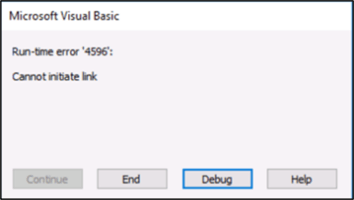
APAS B81.1 Link being lost between APAS and Word when amending Letters or Drafts Occasionally, when amending letters and then selecting the 'Continue Print/Email' macro button in Word, a message is displayed informing the user that there has been an error because the link between APAS and Word has been lost as seen below: |
|
|
|
|
107182 |
Users must save the Letter Request screen before selecting Digital Signature Icon
(SharePoint customers only) |
|
108860 |
APAS - B82.1 - Agile DMS - Create version with hardcoded module Planning |
|
109479 |
APAS - Citizen Portal Comments - Only Third-Party Role available in APAS Review screen. An issue has been fixed where all submissions and objections made through the Citizen Portal were being automatically assigned the role of Third Party. The system now displays Consultee roles where applicable. |
|
109557 |
APAS - Table Wfjob is not clearing when users untick Escalations emails - PA BR EN and PR
|
|
109713 |
APAS - B82.1 - Check Identity token to calculate if needed Issue with access to Diary screen resolved |
|
111229 |
APAS – Conditions, Reasons etc not Updating in Officer Reports |
|
105672
|
Planning fee calculator not updating Fees screen. |
|
111524 |
APAS - ENF - replies from address list tab missing addresses - upgrade issues When recording reply details for a person/organisation from the Enforcements Address List screen, the contact details of the person/organisation were not being displayed in the Reply Screen. This has now been resolved. |
|
111737 |
APAS - Pre-Apps Attribute Screen - key not complete error An error was displayed when users tried to create a user-defined screen within the Pre Planning module. This has now been resolved. |
Enhancements
List of Enhancements for APAS 82.1.
|
DevOps (Internal) Ref |
ISSUE |
|
104890 |
APAS Numeric fields - recording values of 0.00 is not being recognized by the Workflow. |
|
106066 |
APAS sub locations screen needed in other modules DS IN TPO LB and UN The Sub Locations screen is also now available in the Dangerous Structures, Initial Notices, Tree Preservation Order, Historic Assets and Unauthorised Works modules |
|
107255 |
Enhanced Media Screen - Letter Generation 'Publish' method not working correctly – Uniface |
|
107585
|
APAS - amended letters don’t publish to the portal An issue had been identified where a letter that has been amended, was not being uploaded to the media screen should one of the media upload options be selected. This has now been selected. (SharePoint customers only) |
|
107657 |
APAS - PR - Change the way the GIS map is creating the URL to show the map This is related to the development whereby an applicant can digitise the development outline within the map as part of the Citizen Portal Pre-Application submission process. This is currently undergoing testing prior to release. |
|
107751 |
APAS - B82.1 - Copy Amended letters in APAS to Media (SharePoint customers only) |
|
|
|
|
110549 |
APAS - Neighbour/Sublocation - Add new query string parameter to open GIS app |
|
111528 |
APAS - 82.1 - Improve behaviour for Amendment Letters (Publish and Request Signature) -part 4 (SharePoint customers only) |
|
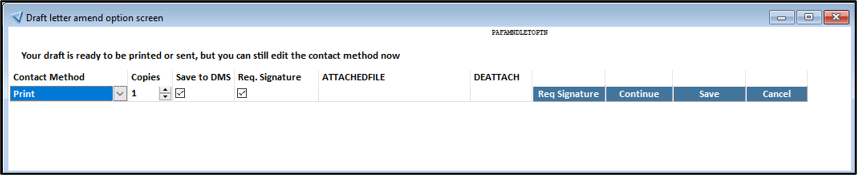
111793 |
APAS - Compliances - BE - Refactor workflow - Planning apps Search condition changes Compliance applications submitted via the Citizen Portal were visible whilst in ‘Draft’ status within APAS. This has since been resolved. |
|
*107255 |
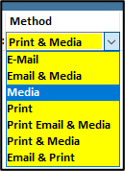
This change helps prevent confusion when uploading letters or correspondence to the Media screen. When a letter is generated using one of the Media options, the publication rules linked to its assigned Document Type determine whether the letter should be made public. (SharePoint customers only) |